

Picture April 14 at 11pm. You're tired, the coffee's cold, and you'd happily reuse one password for everything if it got you to bed sooner. You're not alone. Many break-ins start with a stolen or guessed password, and insurers may ask whether you use MFA. So do tax preparers need it? Yes. MFA for tax preparers isn't just a good idea. The FTC Safeguards Rule requires it, and the IRS keeps telling tax pros to use it on every account that touches client data.
Below: what the rules say, where small offices usually miss it, and how to fix the gaps without a headache.
What is MFA, in plain English?
MFA (multi-factor authentication) is a second lock on the door. Your password is the first key. The second is something you have, like a code or a "Was this you?" prompt on your phone, or a small security key you plug in. If someone steals or guesses your password, they're still stuck on the porch without that second key.
What does the FTC Safeguards Rule require for MFA?
The Safeguards Rule is the FTC's (Federal Trade Commission's) rule for protecting customer data, and it covers tax preparers and accounting firms (the full FTC Safeguards Rule for tax preparers). It lists MFA as a must-have. Section 314.4(c)(5) says you must:
"Implement multi-factor authentication for any individual accessing any information system, unless your Qualified Individual has approved in writing the use of reasonably equivalent or more secure access controls."
Three phrases do the heavy lifting:
- "Any individual." That's everyone: owners, staff, seasonal preparers and outside providers.
- "Any information system." Not just your tax software. Email, cloud storage (online file storage like Dropbox or OneDrive), client document portals and remote access all count if they hold or reach client data.
- The exception is narrow and written. Want to use something other than MFA? Your Qualified Individual (the person you've put in charge of security) has to approve it in writing as just as strong or stronger.
The small-firm break for businesses with fewer than 5,000 consumers' records does not cover MFA. Big office or tiny office, it applies.
What does the IRS say about MFA?
IRS Publication 4557, Safeguarding Taxpayer Data, lists "Implement multi-factor authentication for anyone accessing customer information on your system" among its basic security steps. It calls MFA "a critical step to protecting accounts," points out that tax software now offers it, and advises using "the most secure option available, not only for your tax software, but other products such as email accounts and storage provider accounts."
IRS Publication 5708, the IRS's WISP template for tax practices (a WISP is your written security plan), also repeats the Safeguards Rule MFA requirement, and its sample policy uses MFA for remote login. That sample mentions text-message codes. CISA, the federal government's cybersecurity agency, rates stronger methods higher (more on that below).
Why does MFA matter so much?
Many break-ins start with a stolen or guessed password. MFA can shut that door, because the password alone isn't enough. That protects your clients from tax-related identity theft, and it spares your office the long cleanup after a breach (what happens after a tax firm data breach).
It can matter for insurance, too. If you carry cyber or data theft insurance, dig out your policy and any application you signed. If they ask about MFA, make sure "yes" is true for every account. Yes, even the shared inbox.
Where do small offices miss MFA?
These are the logins that slip through the cracks. Check each one:
- The owner's own email. Often set up years ago, back before MFA was a thing anyone turned on.
- Shared inboxes like office@ or returns@ that "nobody owns."
- Cloud storage and client portals.
- Remote access to an office computer or server.
- Seasonal staff accounts made in a rush in January.
- Former employees' accounts that were never shut off.
- Vendor or IT provider admin accounts (the master keys outside helpers use to get into your systems).
How do you roll out MFA without chaos?
- Make a list first. Write down every system that holds or reaches client data. Your WISP's data inventory is the natural home for this.
- Pick the method. Authenticator apps (phone apps that show a short login code) or security keys beat text-message codes. CISA's multifactor authentication guidance recommends phishing-resistant MFA where you can. Phishing is when a fake email or website tricks someone into handing over a login.
- Start with email and tax software. These are the prize targets.
- Turn it on for admins first, then everyone else. Admins are the people with the master keys.
- Plan for lost phones. Someone will drop theirs in a parking lot. Write down how they get back in, and who approves it.
- Record it in your WISP. Note which systems use MFA, which method, and any written exceptions.
- Do it outside January–April if you can. Nobody wants a new login routine during the shoebox-of-receipts season.
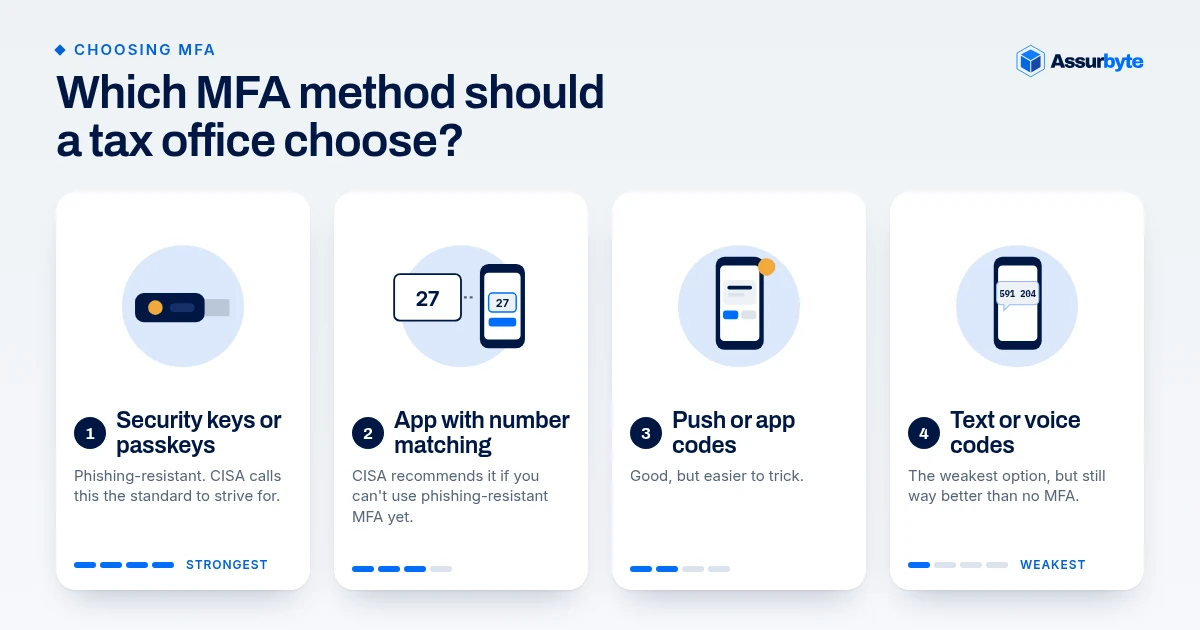
Which MFA method should a tax office choose?
Not all MFA is equal. CISA ranks the options roughly like this, strongest first:
- Phishing-resistant MFA (FIDO/WebAuthn security keys or passkeys). These are small keys or built-in phone logins that only work on the real website. CISA calls this the standard to strive for, because it blocks logins on fake websites.
- Authenticator app with number matching. The screen shows a number, and you type it into your phone app. CISA recommends this if you can't use phishing-resistant MFA yet, because it resists "push bombing" (sending prompt after prompt until a worn-out person taps Approve just to make it stop).
- Plain push notifications or one-time codes from an app. Good, but easier to trick.
- Text message (SMS) or voice codes. The weakest option, but still way better than no MFA.
For a small office, a sensible goal: an authenticator app with number matching for everyone, plus security keys for the owner and anyone with admin rights.
How do you document MFA in your WISP?
Whatever you pick, write it in the safeguards section of your WISP (what a WISP should include): which systems need MFA, which method each uses, how lost phones are handled, and any written exceptions your Qualified Individual approved. Bonus: it makes insurance questions much easier to answer truthfully.
FAQ
Is text-message MFA good enough?
It's far better than nothing, but CISA recommends stronger methods, like authenticator apps with number matching or security keys, where available.
Our software doesn't support MFA. Now what?
Your Qualified Individual can approve an equivalent or stronger control in writing. Document it, and consider whether the software is still the right fit.
Do part-time or seasonal staff need MFA?
Yes. The rule says "any individual accessing any information system."
Does the small-firm exemption cover MFA?
No. The exemption for firms with fewer than 5,000 consumers' records does not cover MFA. It applies regardless of size.
Not sure where you stand?
Take our free Small Office Security Checkup. It takes a few minutes, and every "no" is a gap worth writing down.
This is general information, not legal advice. Check legal questions with your own counsel. Assurbyte helps offices get ready; we don't give legal sign-off.
Sources
- 16 CFR 314.4(c)(5) (eCFR): https://www.ecfr.gov/current/title-16/section-314.4
- 16 CFR 314.6, Exceptions: https://www.ecfr.gov/current/title-16/section-314.6
- IRS Publication 4557, Safeguarding Taxpayer Data: https://www.irs.gov/pub/irs-pdf/p4557.pdf
- IRS Publication 5708: https://www.irs.gov/pub/irs-pdf/p5708.pdf
- CISA, Multifactor Authentication: https://www.cisa.gov/MFA